
Introduction
“How long will this take?” “What exactly am I paying for?” “How will I know if you’re making progress?”
These are the top three questions we hear from founders considering custom software development.
And they’re great questions.
Building custom software can feel like a black box. You hand over a deposit, wait weeks or months, and hope what comes out the other end matches what you had in mind.
At JournAI, we don’t work that way.
Our 6-Phase Build Methodology is designed for complete transparency. You’ll know exactly what we’re doing, when we’re doing it, and why it matters—every step of the way.
In this guide, you’ll learn:
- The 6 phases of our development process
- What happens in each phase (and why)
- What deliverables you receive at each milestone
- How we ensure you’re never in the dark
- Why this approach leads to better software
Whether you work with us or another agency, understanding this process will help you evaluate any development partner.
Let’s break down each phase.
Phase 1: Discovery & Requirements (Week 1-2)
Duration: 10-15 business days
Your investment: 25% of total project cost
Deliverables: Requirements document, technical specification, project roadmap
What Happens:
Most agencies skip this phase or rush through it in a few days. That’s a mistake.
Poor planning is the #1 reason software projects fail. We spend two full weeks understanding your business, users, and technical requirements before writing a single line of code.
Week 1: Understanding Your Business
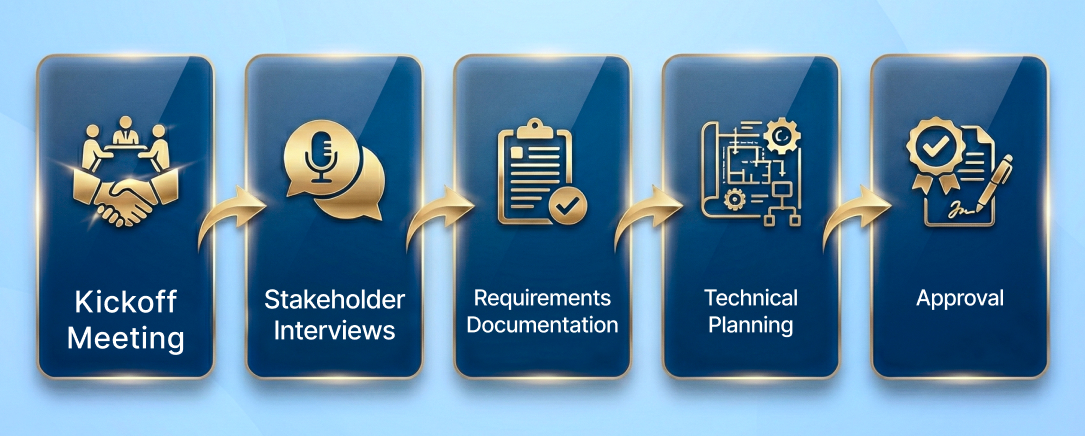
Day 1-2: Kickoff Workshop (4-6 hours)
- Meet your entire development team
- Deep-dive into your business model
- Map user journeys and pain points
- Identify success metrics
- Review competitor solutions
- Discuss technical constraints
Day 3-5: Stakeholder Interviews We talk to the people who will actually use the software:
- End users (customers, patients, buyers)
- Administrators (your team who manages it)
- Technical stakeholders (IT team, existing vendors)
- Business stakeholders (executives, department heads)
Why? Because the person paying for software isn’t always the person using it. We need to understand all perspectives.
Day 6-10: Requirements Documentation We translate everything we’ve learned into clear, written specifications:
- User stories (“As a [user type], I want to [action] so that [benefit]”)
- Feature requirements (what it must do)
- Non-functional requirements (performance, security, compliance)
- Integration requirements (what it must connect to)
- Design preferences and brand guidelines
Week 2: Technical Planning
Day 11-12: Technical Architecture Our engineering team designs:
- Database schema (how we’ll structure your data)
- API architecture (how components communicate)
- Third-party integration strategy
- Security architecture
- Scalability approach
- Technology stack selection
Day 13-14: Project Roadmap & Timeline We create a detailed project plan:
- Feature prioritization
- Development sprints (2-week cycles)
- Milestone dates
- Testing phases
- Launch timeline
- Post-launch support plan
Day 15: Discovery Review Meeting We present everything to you in a 2-hour meeting:
- Requirements document walkthrough
- Technical architecture explanation
- Project timeline and milestones
- Budget allocation across phases
- Risk assessment and mitigation
- Questions and adjustments
What You Receive:
Requirements Document (30-50 pages)
- Complete feature specifications
- User stories and acceptance criteria
- Technical requirements
- Integration requirements
- Compliance requirements
Technical Specification Document
- System architecture diagrams
- Database schema
- API documentation plan
- Security protocols
- Technology stack rationale
Project Roadmap
- Detailed timeline (week-by-week)
- Milestone schedule
- Payment schedule tied to deliverables
- Risk assessment and mitigation plan
Why This Phase Matters:
Without Discovery:
- Features get missed or misunderstood
- Development time doubles due to changes
- Budget overruns are common
- Final product doesn’t match expectations
With Discovery:
- Everyone aligned on what’s being built
- Accurate timeline and budget
- Minimal mid-project changes
- Delivered product matches vision
We don’t start Phase 2 until you’ve approved every detail in writing.
Phase 2: Design & User Experience (Week 3-4)
Duration: 10-12 business days
Payment milestone: Due at start of this phase
Deliverables: Wireframes, UI mockups, design system, clickable prototype

What Happens:
Good software isn’t just functional—it’s intuitive and enjoyable to use. This phase turns your requirements into actual screens and user flows.
Week 3: Wireframing & Information Architecture
Day 1-3: Wireframes We create low-fidelity wireframes (simple, grayscale layouts) for every screen:
- User registration and login flows
- Main dashboard and navigation
- Core feature screens
- Admin panels
- Mobile responsive layouts
Wireframes focus on structure and functionality, not colors or branding yet.
Day 4-5: User Flow Mapping We document how users move through your application:
- Onboarding flow
- Core task completion flows
- Error states and edge cases
- Admin workflows
Day 6-7: Review & Refinement
- Present wireframes to you
- Walk through user flows
- Incorporate feedback
- Make revisions
Week 4: High-Fidelity Design
Day 8-10: UI Design Our designers create pixel-perfect mockups with:
- Your brand colors and typography
- Custom icons and illustrations
- Imagery and photography
- Spacing and layout refinement
- Responsive designs (desktop, tablet, mobile)
Day 11: Design System Creation We build a design system that ensures consistency:
- Color palette (primary, secondary, accent colors)
- Typography system (headings, body text, captions)
- Button styles (primary, secondary, disabled states)
- Form elements (inputs, dropdowns, checkboxes)
- Component library (cards, modals, alerts)
Day 12: Interactive Prototype We create a clickable prototype using Figma or similar tools:
- Click through the actual user experience
- Test navigation and flows
- Experience interactions and animations
- Share with stakeholders for feedback
What You Receive:
Complete UI Mockups
- All screens in high-fidelity
- Desktop, tablet, and mobile versions
- Interactive states (hover, active, disabled)
- Exported in developer-ready formats
Clickable Prototype
- Fully interactive demo
- No code required
- Share with team and investors
- Test with real users before development
Design System Documentation
- Style guide
- Component library
- Brand guidelines for consistency
- Design tokens for developers
Why This Phase Matters:
Designing before coding means:
- You see exactly what you’re getting
- Changes are easy and inexpensive
- Developers build faster (clear specifications)
- Final product matches your vision
- Better user experience = higher adoption
We don’t write code until you’ve approved the designs.
Phase 3: Development (Week 5-12+)
Duration: Varies by project scope (6-16 weeks typical)
Payment milestones: 25% at midpoint, 25% at completion
Deliverables: Working software, weekly progress updates, staging environment access
What Happens:
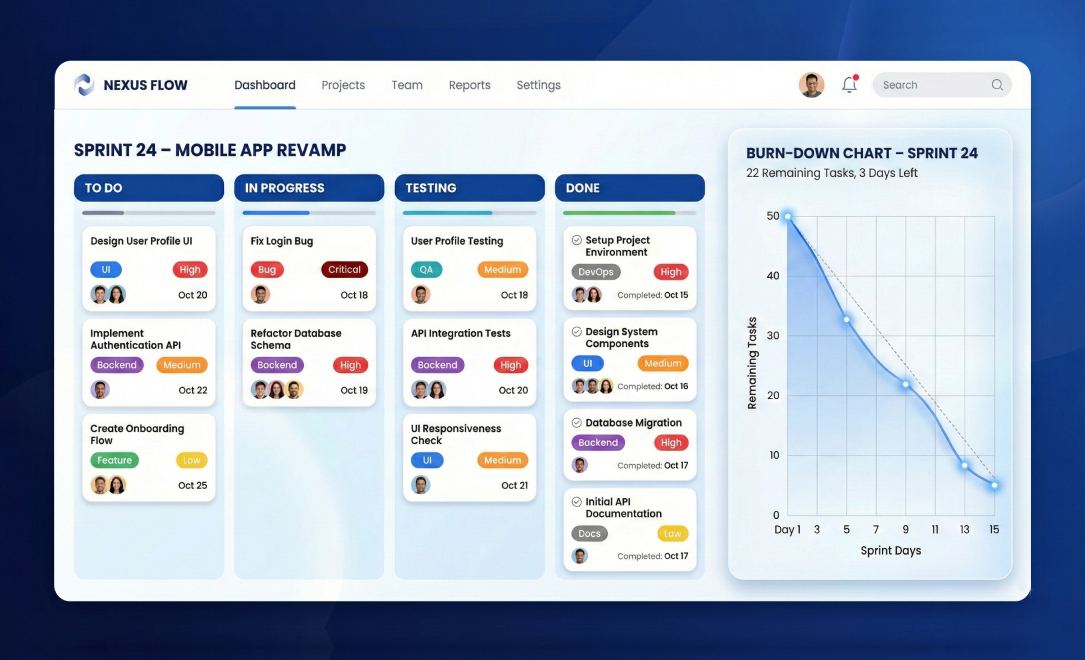
This is where your software comes to life. We build in 2-week sprints using Agile methodology, giving you working software to review every two weeks.
Our Development Approach:
Sprint Structure (2 weeks each):
Days 1-2: Sprint Planning
- Review priorities with you
- Select features for this sprint
- Break features into technical tasks
- Assign tasks to developers
- Set sprint goals
Days 3-12: Daily Development
- Daily team standups (15 min)
- Code development and testing
- Daily Git commits (you can see progress)
- Continuous integration
- Peer code reviews
Days 13-14: Sprint Review & Demo
- Demo working features to you
- Gather feedback
- Deploy to staging environment
- Plan next sprint
What We Build:
Backend Development:
- Database design and implementation
- API development (RESTful)
- Business logic and algorithms
- Third-party integrations
- Authentication and authorization
- Background jobs and queues
- AI/ML model integration
Frontend Development:
- Responsive web application
- User interface implementation
- Interactive components
- Form handling and validation
- Real-time features (if applicable)
- Mobile apps (iOS/Android if scoped)
Infrastructure:
- Cloud server setup (AWS/Azure)
- Database configuration
- File storage and CDN
- Email service setup
- SMS/notification services
- Security configuration
How We Keep You Informed:
Weekly Progress Updates (Every Monday): Email update including:
- Features completed last week
- Current sprint progress
- Next week’s priorities
- Any blockers or risks
- Updated timeline (if needed)
Bi-Weekly Demo Calls (Every Other Friday): 30-60 minute video call:
- Live demo of new features
- Q&A session
- Feedback collection
- Priority adjustments
24/7 Access to Development:
- Staging environment (test live features)
- GitHub repository (see actual code)
- Project management board (Jira/Trello)
- Slack channel (daily communication)
What You Receive:
Working Software (Staging Environment)
- Access credentials to test environment
- Updated every 2 weeks
- Real data (sanitized)
- All features you can actively test
Progress Reports
- Weekly status updates
- Sprint completion reports
- Code quality metrics
- Test coverage reports
Code Repository Access
- GitHub/GitLab access
- See every commit and change
- Review code quality
- Transparency in development
Why This Phase Matters:
Agile development means:
- You see progress every 2 weeks
- Changes can be made early
- Risks are identified quickly
- Quality is built-in, not added later
- You’re involved throughout
Traditional “waterfall” development shows you nothing for months, then dumps everything on you at once. Our approach keeps you in control.
Phase 4: Quality Assurance & Testing (Week 13-14)
Duration: 10-15 business days (overlaps with development)
Payment milestone: Included in Phase 3 payment
Deliverables: Test reports, bug tracking, performance reports
What Happens:
Quality isn’t something we add at the end—it’s built into every phase. But before launch, we run comprehensive testing to ensure 99.9% uptime reliability.
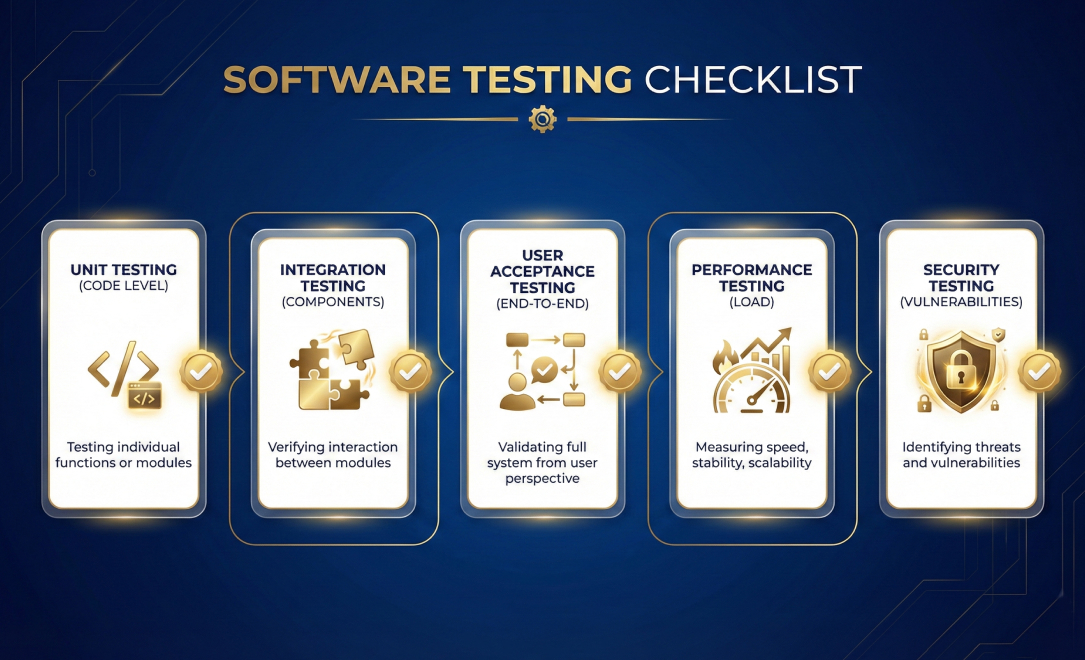
Our Testing Protocol:
1. Unit Testing (Continuous)
- Every function and component tested
- 80%+ code coverage minimum
- Automated tests run on every commit
- Catches bugs at the source
2. Integration Testing
- Test how components work together
- API endpoint testing
- Database transaction testing
- Third-party integration verification
3. User Acceptance Testing (UAT)
- Real-world scenario testing
- Test every user journey end-to-end
- Different user roles and permissions
- Edge cases and error handling
4. Performance Testing
- Load testing (how many users can it handle?)
- Speed optimization (page load times)
- Database query optimization
- API response time testing
5. Security Testing
- Penetration testing
- SQL injection prevention
- XSS (cross-site scripting) protection
- Authentication and authorization testing
- Data encryption verification
- OWASP Top 10 compliance
6. Browser & Device Testing
- Chrome, Firefox, Safari, Edge
- Desktop, tablet, mobile
- iOS and Android (if applicable)
- Different screen sizes and resolutions
7. Compliance Testing (if applicable)
- HIPAA compliance verification
- SOC 2 controls testing
- PCI-DSS requirements
- GDPR data protection
Bug Tracking & Resolution:
We use a severity-based system:
🔴 Critical (P0):
- Application crashes or major security issues
- Fixed within 4 hours
- Examples: Payment processing fails, data breach, login broken
🟠 High (P1):
- Major features don’t work
- Fixed within 24 hours
- Examples: Email not sending, reports incorrect data
🟡 Medium (P2):
- Features work but have issues
- Fixed within 3 days
- Examples: UI alignment issues, slow loading
🟢 Low (P3):
- Minor cosmetic issues
- Fixed before launch or in Phase 6
- Examples: Typos, color inconsistencies
What You Receive:
Test Reports
- Unit test coverage reports
- Integration test results
- Performance benchmarks
- Security audit results
Bug Tracking Access
- Real-time bug tracker access
- See what we’re fixing
- Priority levels assigned
- Resolution timeline
Performance Reports
- Page load speed analysis
- Server response times
- Database query performance
- Scalability projections
Why This Phase Matters:
Comprehensive testing means:
- Bugs caught before users find them
- Confident launch day
- Reliable, stable application
- Professional user experience
- Fewer post-launch fires
- We don’t launch until all P0 and P1 bugs are resolved.
Phase 5: Deployment & Launch (Week 15)
Duration: 5-7 business days
Payment milestone: Final 25% due at launch
Deliverables: Live application, DNS configuration, SSL certificates, monitoring setup
What Happens:
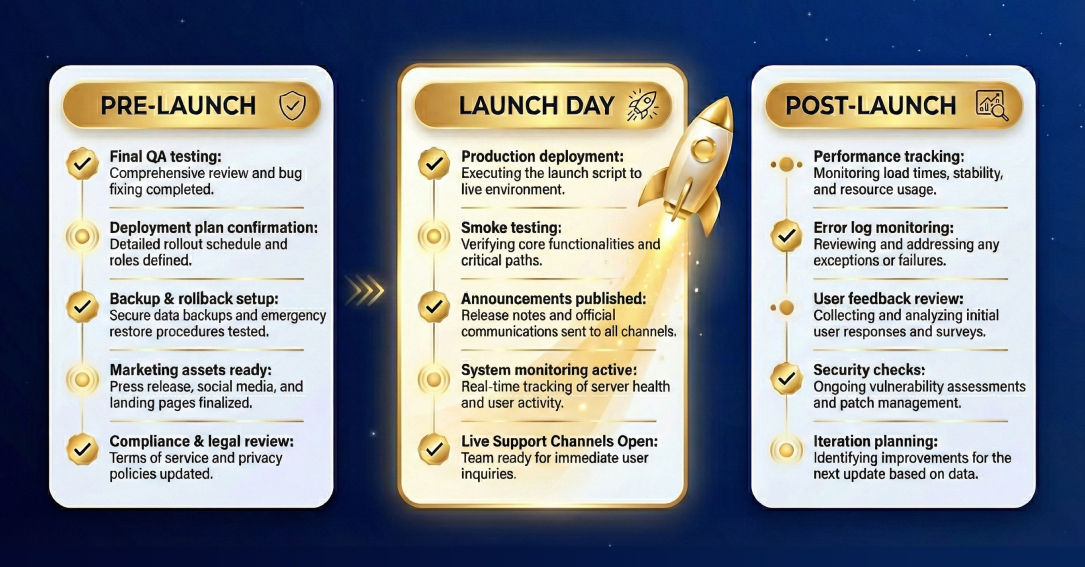
Launch day is exciting—but it requires careful planning. We handle all technical aspects while keeping you informed at every step.
Week Before Launch:
Day 1-2: Final Testing
- Full regression testing
- Load testing at expected traffic
- Backup and recovery testing
- Documentation review
Day 3-4: Production Environment Setup
- Production server configuration
- Database optimization
- CDN setup for static assets
- SSL certificate installation
- DNS configuration
- Email deliverability setup
Day 5-7: Data Migration (if applicable)
- Import existing data
- Verify data integrity
- Test with production data
- Backup procedures
Launch Day:
Morning:
- Final security check
- Performance verification
- Monitoring dashboards active
- Team on standby
Afternoon:
- DNS cutover (point domain to new server)
- SSL verification
- Smoke testing (quick functionality check)
- Monitoring all systems
- Evening:
- User acceptance confirmation
- Performance monitoring
- Bug monitoring
- Team standby for issues
What We Monitor:
First 24 Hours:
- Server uptime and performance
- Error rates and exceptions
- User registration and login success
- Payment processing (if applicable)
- Email delivery rates
- Page load times
- Database performance
First Week:
- User behavior and adoption
- Feature usage analytics
- Performance trends
- Any reported issues
- Security monitoring
What You Receive:
Live Application
- Production URL configured
- SSL certificate active
- All features live and tested
- Monitoring active
Complete Documentation
- User guide (how to use the software)
- Admin guide (how to manage it)
- Technical documentation (for developers)
- API documentation (if applicable)
Access & Credentials
- Admin login credentials
- Server access (if requested)
- Database access (if requested)
- Analytics dashboard access
- Monitoring dashboard access
Why This Phase Matters:
- Proper deployment means:
- Smooth launch with no downtime
- Immediate issue detection
- Professional first impression
- User confidence from day one
Launch isn’t the end—it’s just the beginning.
Phase 6: Post-Launch Support (30-90 Days)
Duration: 30 days included, extended support optional
Payment: Included in project cost
Deliverables: Bug fixes, minor adjustments, performance optimization, training

What Happens:
The first month after launch is critical. Real users find edge cases that testing missed. Usage patterns reveal optimization opportunities.
We don’t disappear after launch—we’re with you every step of the way.
Days 1-7: Intensive Monitoring
What we do:
- Monitor performance 24/7
- Track error rates and exceptions
- Analyze user behavior
- Collect user feedback
- Fix any critical issues immediately
What you get:
- Daily check-in emails
- Immediate response to issues
- Real-time bug fixes
- Performance optimization
Days 8-30: Optimization & Refinement
What we do:
- Fix all remaining bugs
- Optimize slow queries or pages
- Refine UI based on user feedback
- Adjust features based on usage data
- Answer technical questions
- Train your team
What you get:
- Weekly check-in calls
- Priority bug fixing (P0/P1 within 24 hours)
- Minor feature adjustments
- Team training sessions
- Technical documentation updates
What’s Included (Free):
Bug Fixes
- Any bugs discovered post-launch
- No limit on number of fixes
- P0/P1 fixed within 24 hours
Performance Optimization
- Speed improvements
- Database query optimization
- Load time enhancements
Minor Adjustments
- Copy changes
- Small UI tweaks
- Email template updates
- Minor UX improvements
Training
- Admin panel training (2-hour session)
- User documentation walkthrough
- Best practices guidance
- Q&A sessions
Monitoring
- Uptime monitoring
- Error tracking
- Performance monitoring
- Usage analytics
What’s NOT Included:
New Features
- Additional functionality
- Major scope additions
- New integrations
Major Redesigns
- Complete UI overhauls
- Architecture changes
- These can be scoped as Phase 2 projects.
After 30 Days:
Option 1: Extended Support Plan
- $500-2,000/month depending on complexity
- Continued monitoring
- Priority bug fixes
- Monthly feature updates
- Server maintenance
Option 2: On-Demand Support
- Hourly rates ($150-200/hour)
- As-needed basis
- No monthly commitment
Option 3: Phase 2 Development
- Build additional features
- Scale for growth
- Add integrations
- New platforms (mobile apps, etc.)
What You Receive:
30-Day Performance Report
- Usage statistics
- Performance metrics
- User feedback summary
- Optimization recommendations
- Suggested improvements for Phase 2
Complete Training Materials
- Video tutorials
- Written guides
- FAQ documentation
- Best practices
Stable, Optimized Application
- All bugs resolved
- Performance optimized
- Team trained
- Ready to scale
Why This Phase Matters:
Post-launch support means:
- You’re never left alone
- Issues are caught and fixed quickly
- Your team learns the system
- Application is refined based on real usage
- Foundation for long-term success
Most agencies disappear after launch. We stick around to ensure your success.
Our Commitments Throughout All 6 Phases
Transparency:
- Weekly progress updates (no surprises)
- 24/7 access to code and staging environment
- Bi-weekly video demos (see what we’re building)
- Open Slack channel (ask questions anytime)
- Honest communication about risks and blockers
Quality:
- 99.9% uptime protocols
- 80%+ automated test coverage
- Peer code reviews (every line reviewed)
- Security best practices (OWASP Top 10)
- Performance benchmarks met
Ownership:
- You own 100% of the code
- Complete documentation provided
- No vendor lock-in
- Transfer all access and credentials
- Any developer can maintain it
Conclusion
Process Creates Predictability
Building custom software doesn’t have to be a leap of faith.
Our 6-Phase Build Methodology removes the uncertainty:
- Discovery → Clear requirements and timeline
- Design → See exactly what you’re getting
- Development → Working software every 2 weeks
- Testing → Quality built-in from day one
- Deployment → Smooth, professional launch
- Support → We’re with you after launch
The result?
- Projects delivered on time and on budget
- Software that matches your vision
- Professional, reliable applications
- Long-term partnerships built on trust
Ready to Start Your Project?
We offer free 30-minute consultation calls where we’ll:
✓ Discuss your concept and requirements
✓ Walk through our process in detail
✓ Answer all your questions
✓ Provide a ballpark timeline and budget
✓ Show you examples of our work
Because great software starts with a great process.
Frequently Asked Questions
Q: Can we skip the Discovery Phase to save time and money?
A: We strongly advise against it. Discovery is only 10-15 days but saves months of rework. Projects without proper discovery:
- Take 2-3x longer due to changes
- Cost 40-60% more due to scope creep
- Rarely match the client’s vision
- Create frustration for everyone
The 2-week investment saves months of headaches.
Q: What if we need to make changes during development?
A: Minor adjustments are expected and included. Significant changes (new features, major UI changes, additional integrations) are documented as change orders with transparent pricing and timeline impact. We’ll never surprise you with extra fees.
Q: Can we see the code as you’re building?
A: Absolutely! You get GitHub/GitLab access from day one. You can see every commit, review code quality, and even run the staging environment locally if you want.
Q: What happens if you find issues during testing?
A: We fix them. All bugs discovered during QA are included in the project cost. We don’t launch until all P0 (critical) and P1 (high priority) bugs are resolved.
Q: Do you offer ongoing maintenance after the 30-day support period?
A: Yes! We offer flexible support plans:
- Monthly retainers ($500-2,000/month)
- Hourly on-demand support ($150-200/hour)
- Phase 2 development for new features
Many clients choose monthly support for peace of mind.
Q: How do you handle intellectual property?
A: You own 100% of the code, designs, and intellectual property we create for you. We transfer everything at launch. No strings attached, no licensing fees.